Darmowy hotspotDarmowy hotspot w każdym planie Bez ograniczania prędkości w Horizonod €0.27 7–30 dni
Wybierz swój plan
Ile danych i na jak długo?
01Porównaj dane na długość swojej podróży
30 dni
7 dni
15 dni
Ważność zaczyna biec dopiero od pierwszego połączenia z obsługiwaną siecią na miejscu. Nie ma terminu na pierwsze użycie. Możesz kupić pakiet teraz i zachować go na przyszłą podróż. Pełny zwrot na życzenie, za używaną lub nieużywaną eSIM. Na życzenie zawsze zwracamy całą zapłaconą kwotę, niezależnie od tego, czy eSIM jest nieużywana, częściowo czy całkowicie wykorzystana. Nie ma terminu na złożenie wniosku o zwrot.
Jedziesz też gdzieś indziej?
Dodaj kolejny kraj — każdy to osobny eSIM, wszystkie zarządzane w jednej aplikacji.
Potrzebujesz szerszego zasięgu?
Poznaj nasze regionalne i globalne eSIM-y — pakiety zaczynają się od pokazanej ceny, a ich zasięg obejmuje też kierunek Macedonia Północna.
“I used the Horizon Balkans eSIM on a recent trip. The best part was not having to think about buying a new SIM every time I crossed a border. I used it for maps, WhatsApp, checking hotels, finding restaurants, and looking up beaches and places to visit.
The package covers Albania, Bosnia and Herzegovina, Bulgaria, Croatia, Greece, Montenegro, North Macedonia, and Serbia and I added Kosovo eSIM to the same order. I would use it again for another trip through the Balkans”
EN
“Buying was super fast and the installation was very easy. I also used the Family and Friends feature to buy eSIMs for my parents. This is the best feature that others don't have. They were able to install it super easily, and I can track their data and refill it for them. Highly recommended.”
EN
“Used this eSIM in North Macedonia and it worked really well. Setup was quick, the connection was fast and stable, and I had no problems using mobile data during the trip. Very convenient and easy to use. I would buy it again.”
Nie ma terminu na pierwsze użycie. Możesz kupić pakiet teraz i zachować go na przyszłą podróż.
eSIM do Macedonii Północnej: Skopje, Ochryda i górskie trasy
Porównaj plany eSIM do Macedonii Północnej na transfery z lotniska, pobyty nad jeziorem i podróże samochodem. Sprawdź ilość danych, okres ważności, listę objętych krajów i zgodność urządzenia.
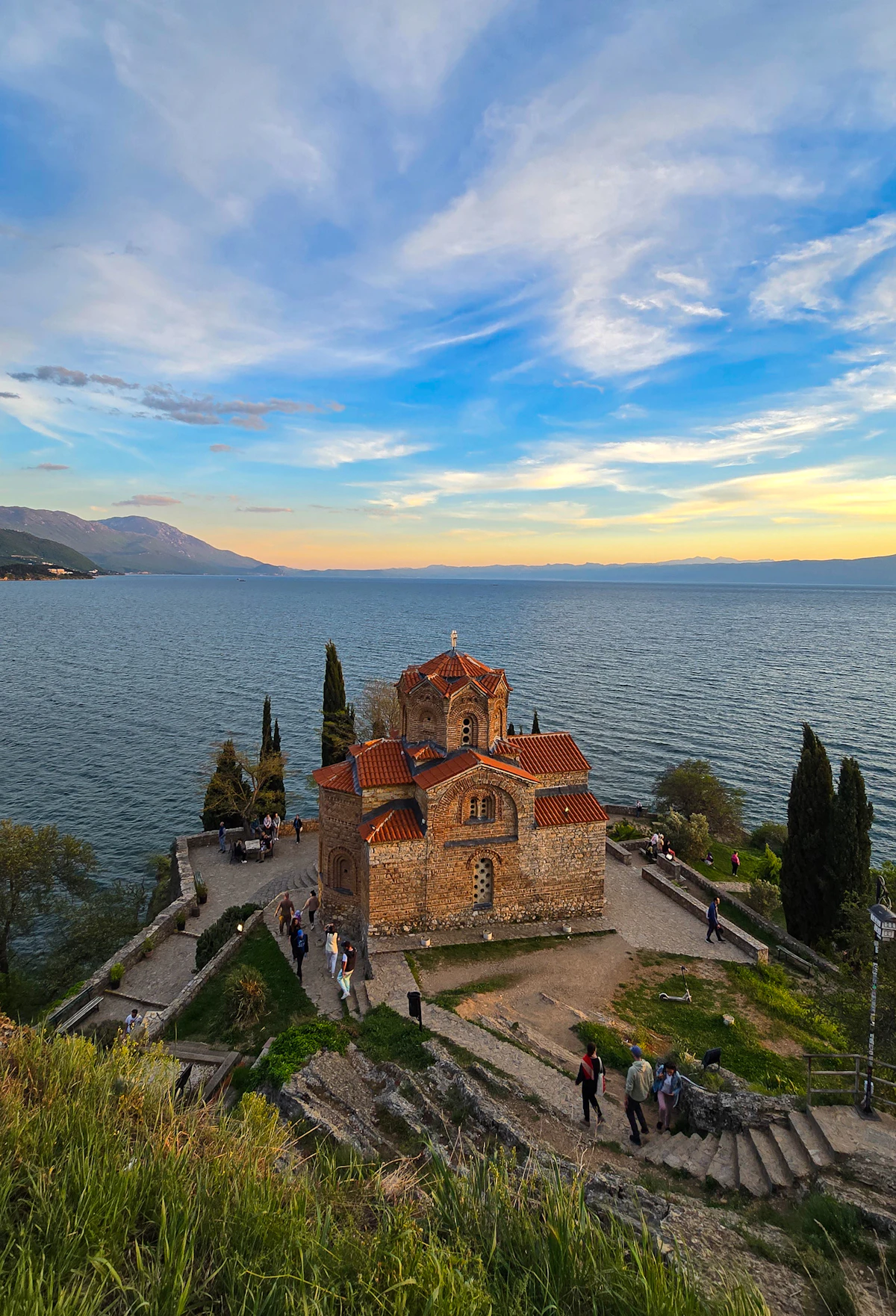
Podróż do Macedonii Północnej może zacząć się od transferu do Skopje dopasowanego do godzin lotu, prowadzić dalej do Ochrydy i kończyć się w Mawrowie. Dane pomagają sprawdzić rozkłady autobusów, napisać wiadomość do miejsca noclegowego i nawigować po drodze, ale nad brzegiem jeziora, w wąwozach i na górskich drogach zasięg może być ograniczony. Zapisz offline pierwszy transfer do Skopje, pinezkę noclegu w Ochrydzie i trasę do Mawrowa — jakość połączenia zależy od wybranego planu, urządzenia, dokładnej lokalizacji, terenu i sieci partnerskiej.
Zainstaluj eSIM przy stabilnym Wi-Fi na lotnisku lub w hotelu i zapisz instrukcję offline. Po przylocie wybierz go jako linię danych i wykonaj wyłącznie kroki aktywacji podane dla tego planu. Przed wyjazdem do Ochrydy lub Mawrowa pobierz trasę i pozostaw roaming wyłączony na karcie domowej, chyba że jest świadomie potrzebny.
1
Kup plan
Wybierz kierunek, pakiet danych i okres ważności.
2
Zainstaluj eSIM
Zeskanuj kod QR lub zainstaluj automatycznie w aplikacji — bez fizycznej karty SIM.
3
Wyląduj i połącz się
Dane aktywują się przy pierwszym połączeniu w miejscu docelowym.
Orientacyjnie: city break na 3–4 dni to około 1–3 GB, tygodniowy wyjazd — 3–5 GB, dwutygodniowa trasa po kilku krajach — 8–12 GB, a praca w podróży to około 1 GB dziennie, czyli co najmniej 15 GB na dwa tygodnie.
Łącznie pakiet 5 GB wystarcza na około 1700 udostępnionych zdjęć, 83 godzin mediów społecznościowych i przeglądania, 15 godzin wideorozmów, 63 godzin streamingu muzyki lub około 1000 godzin map i nawigacji. Komunikatory prawie nie zużywają danych.
Lotnisko w Skopje podaje, że rozkład jazdy autobusu wahadłowego jest dopasowany do przylotów i odlotów, dlatego przed opuszczeniem terminalu sprawdź aktualny przystanek i godziny. W mieście dane pomagają znaleźć połączenia autobusowe, godziny otwarcia muzeów oraz trafić do Kamiennego Mostu czy na Stary Bazar; zapisz offline adres hotelu i pierwszą trasę.
eSIM Skopje — skonfiguruj przed wylotem
Ochryda · Przewodnik po mieście
Ochryda
W okolicach Ochrydy użyj danych, aby sprawdzić informacje o locie lub autobusach międzymiastowych, porównać aktualne odjazdy łodzi oraz sprawdzić godziny otwarcia i pobrać bilety na atrakcje starówki. Przed wycieczką nad brzeg jeziora zapisz pinezkę noclegu, miejsce spotkania i trasę powrotną, ponieważ poza centrum zasięg może się różnić i nie powinien zastępować mapy offline.
eSIM Ochryda — skonfiguruj przed wylotem
Bitola · Przewodnik po mieście
Bitola
W Bitoli dane komórkowe pomagają potwierdzić autobus międzymiastowy, znaleźć właściwe wejście do Heraclea Lyncestis oraz napisać wiadomość do kwatery w pobliżu Širok Sokak. Przed wyjściem do zabytku sprawdź informacje o godzinach otwarcia i pobierz dalszy rozkład jazdy oraz pinezkę stacji, jeśli wczesny wyjazd zostawia mało czasu na rozwiązywanie problemów.
eSIM Bitola — skonfiguruj przed wylotem
Mavrovo · Przewodnik po mieście
Mavrovo
Przed wjazdem w rejon Mawrowa pobierz trasę jazdy lub pieszą, informacje o pogodzie, dane o noclegu oraz opcję powrotu. Górski teren może przerywać zasięg między wioskami a szlakami, dlatego traktuj dane komórkowe jako pomocne uzupełnienie mapy offline, odpowiedniego sprzętu i przygotowania pod kątem bezpieczeństwa opartego na lokalnej wiedzy.
eSIM Mavrovo — skonfiguruj przed wylotem
Dlaczego Horizon
Wybór na trasę nad jeziorem i w górach
Dopasuj ilość danych i okres ważności do całej trasy. Sprawdź każdy kraj z listy; nie zakładaj, że plan na jeden kraj obejmuje też wjazd do Albanii, Kosowa, Grecji, Serbii czy Bułgarii.
Horizon eSIM Przed podróżą
Plan na
Macedonia Północna
Porównaj szczegóły planu
Sprawdź zgodność urządzenia
Zainstaluj przez Wi-Fi przed wyjazdem
Elastyczny wybór
Lepsze plany, skrojone pod prawdziwe podróże
Porównaj podane pakiety danych i okresy ważności dla swojego kierunku.
Przed wyjazdem
Prosty w obsłudze
Zainstaluj przez stabilne Wi-Fi przed wyjazdem i postępuj według instrukcji aktywacji planu.
Czytelne porównanie
Porównaj cały plan
Przejrzyj aktualną cenę, dane, ważność i zasięg przed zakupem. Plany Horizon nie mają ograniczania prędkości.
Ponowne użycie, gdy można
Wykorzystaj eSIM ponownie
Gdy wybrany plan pozwala na ponowne użycie lub doładowania, sekcja Moje eSIM-y pokazuje dostępne opcje dla zainstalowanego profilu.
Kontrola zużycia
Bądź online
Powiadomimy Cię, gdy zbliżysz się do limitu. Jeśli plan pozwala na doładowanie, Moje eSIM-y pokażą dostępne opcje.
Wiele krajów
Plany globalne i regionalne
Wybierz zasięg krajowy, regionalny lub globalny i sprawdź każdy kierunek w szczegółach planu.
Najczęściej zadawane pytania
Jak wybrać eSIM do Macedonii Północnej?
Dopasuj limit danych i okres ważności do każdego dnia podróży, w tym do nawigacji między Skopje, Ochrydą a przystankami w górach. Przed zakupem sprawdź, czy Macedonia Północna znajduje się na liście, czy telefon obsługuje eSIM oraz czy limit danych w planie pasuje do użycia z laptopem lub w grupie.
Czy moja karta domowa może pozostać aktywna?
Na zgodnym telefonie z dwiema kartami SIM opisz profile przed lądowaniem w Skopje i przypisz transmisję danych do eSIM Macedonii Północnej. Numer domowy może pozostać aktywny na wypadek spodziewanego SMS-a z banku lub pilnego połączenia, ale pilnuj, aby telefon nie przełączył danych z powrotem na niego bez Twojej decyzji. Poczta głosowa, połączenia przychodzące i wychodzące, wiadomości oraz zużycie w tle nadal podlegają umowie operatora domowego. Sprawdź ponownie wybraną linię po restarcie i przed przekroczeniem granicy w kierunku Ochrydy, Albanii, Kosowa, Grecji, Serbii lub Bułgarii, ponieważ plan na miejsce docelowe nie określa opłat na drugim koncie.
Czy połączenia, SMS-y lub hotspot są wliczone?
Plany Horizon dla Macedonii Północnej obejmują wyłącznie dane, bez zwykłych połączeń i SMS-ów. Hotspot jest bezpłatny w każdym planie Horizon.
Czy zadziała w okolicach Ochrydy i Mawrowa?
Plan może się połączyć tam, gdzie dostępna jest obsługiwana sieć lokalna, ale obecność kraju na liście nie oznacza gwarancji zasięgu przy każdym brzegu jeziora, w każdym wąwozie czy na każdym szlaku. Liczy się teren, urządzenie i lokalne warunki, dlatego pobierz trasy, dane o noclegu i instrukcje powrotu, zanim wyjedziesz z Ochrydy lub wjedziesz w rejon Mawrowa.
Czy obejmuje sąsiednie kraje bałkańskie?
Tylko wtedy, gdy każdy kraj na trasie znajduje się na liście zasięgu planu. Nie zakładaj, że plan na Macedonię Północną obowiązuje też po przekroczeniu granicy do Albanii, Kosowa, Grecji, Serbii lub Bułgarii; przed wyjazdem porównaj odpowiedni plan regionalny lub osobne plany na poszczególne kraje.
Co zrobić, jeśli eSIM nie ma danych?
Zanim zmienisz ustawienia, usiądź w bezpiecznym, publicznym miejscu — na lotnisku w Skopje, w miejscu noclegu lub w kawiarni — i skorzystaj z zaufanego połączenia Wi-Fi. Zostaw profil Macedonii Północnej na telefonie, otwórz instrukcję dla zakupionego produktu i sprawdź po kolei jego status, wybraną linię danych, APN, roaming i wskazówki dotyczące wyboru sieci. Jeśli instrukcja każe zrobić restart lub cykl trybu samolotowego, wykonaj go, mając zapisany offline adres w Skopje lub Ochrydzie. W nierozwiązanych przypadkach podaj wsparciu numer zamówienia, model urządzenia, obecne miasto, wyświetlaną sieć lub błąd oraz zasłonięte zrzuty ekranu; nigdy nie podawaj haseł ani pełnych danych płatności.
Czy Horizon spowalnia moje dane?
Nie. Plany Horizon nie mają ograniczania prędkości. Nie ma dziennego limitu, po którym internet zwalnia, więc w razie potrzeby możesz zużyć cały plan w jeden dzień. Prędkość zależy od lokalnej sieci, sygnału i obciążenia sieci. Gdy pakiet danych się skończy, plan przestaje działać, zamiast zwalniać.
Czy dostanę zwrot, jeśli część danych została już wykorzystana?
Tak. Na życzenie zawsze zwracamy całą zapłaconą kwotę, niezależnie od tego, czy eSIM jest nieużywana, częściowo czy całkowicie wykorzystana. Nie ma terminu na złożenie wniosku o zwrot.
Dokąd dalej
Macedonia Północna: inne kierunki, które podróżni często łączą
Używamy plików cookie, żeby Horizon działał, żebyśmy rozumieli, jak jest używany, i mogli mierzyć nasze reklamy. Pozostają włączone, dopóki ich nie wyłączysz — tutaj albo w każdej chwili na stronie cookies.