
اشترِ باقة
اختر الوجهة وحصة البيانات ومدة الصلاحية.






لا يوجد موعد نهائي للاستخدام الأول. يمكنك شراء الباقة الآن والاحتفاظ بها لرحلة مستقبلية.
قارن باقات eSIM للأردن لمتابعة انتقالات مطار الملكة علياء ومعلومات زيارة البتراء ونقاط اللقاء في وادي رم ومواصلات العقبة. قبل الدفع، طابق حجم البيانات والصلاحية مع المسار، وتحقق من النطاق المحدد وتوافق الجهاز، واقرأ المبلغ الإجمالي عند إتمام الشراء.
قد يبدأ مسارك في الأردن باختيار حافلة أو تاكسي المطار أو تطبيق نقل متاح حالياً في مطار الملكة علياء الدولي، ثم يتابع إلى البتراء ووادي رم والعقبة مع مشغلين ونقاط لقاء مختلفة. تساعد بيانات الهاتف في فتح التعليمات الحالية والتواصل مع المضيف، لكنها لا تؤكد تذكرة نقل أو دخول موقع أو حجز استقبال صحراوي أو وضع معبر حدودي. احفظ المسار الأول وعنوان الإقامة وتفاصيل التذاكر وجهات الاتصال الأساسية دون اتصال.
سياسة الاسترداد
نعيد دائمًا كامل المبلغ الذي دفعته عند طلبك، سواء كانت eSIM غير مستخدمة أو مستخدمة جزئيًا أو بالكامل. لا يوجد حد زمني لطلب الاسترداد.
لا موعد نهائي للاستخدام الأول
لا تبدأ الصلاحية إلا عندما يتصل eSIM بشبكة مدعومة في وجهتك. لا يوجد موعد نهائي للاستخدام الأول. يمكنك شراء الباقة الآن والاحتفاظ بها لرحلة مستقبلية.
دفع آمن
البطاقات، Apple Pay، Google Pay — مشفّرة عبر Paysera.
دعم على مدار الساعة بجميع اللغات
ردود فورية مضمونة.
ثبّت eSIM عبر Wi-Fi موثوق مع فتح دليل الباقة المشتراة، واحتفظ بنسخة منفصلة منه. لا تبدأ مدة الصلاحية إلا عندما يتصل eSIM لأول مرة بشبكة جوال مدعومة في الأردن؛ واختر ملف الأردن لبيانات الهاتف فقط في الوقت المحدد. أبقِ التجوال معطلاً على خطك الأساسي إلا إذا كنت تقصد استخدامه وتحمل رسومه. نزّل مسار المطار وخريطة البتراء ونقطة اللقاء وبيانات الدعم قبل مغادرة Wi-Fi.
اختر الوجهة وحصة البيانات ومدة الصلاحية.
امسح رمز QR أو ثبّته تلقائيًا داخل التطبيق — دون شريحة SIM فعلية.
تُفعَّل البيانات عند أول اتصال في وجهتك.
اختر النمط الأقرب إلى رحلتك. ويفترض التقدير استخدامًا عاديًا — خرائط ومراسلة وصور ومكالمة قصيرة إلى الأهل.
كقاعدة عامة، تحتاج رحلة مدينة من 3–4 يوم إلى نحو 1–3 GB، ورحلة أسبوع إلى 3–5 GB، وجولة أسبوعين بين عدة دول إلى 8–12 GB، أما العمل أثناء التنقل فيستهلك نحو 1 GB يوميًا، أي 15 GB أو أكثر لأسبوعين.
إجمالًا، تغطي حصة بيانات قدرها 5 GB نحو 1,700 صورة مشاركة، أو 83 ساعة من وسائل التواصل والتصفح، أو 15 ساعة من مكالمات الفيديو، أو 63 ساعة من بث الموسيقى، أو نحو 1000 ساعة من الخرائط والملاحة. أما تطبيقات المراسلة فتستهلك بيانات ضئيلة.
عمّان · دليل المدينة
تميز الإرشادات الرسمية الحالية لمطار الملكة علياء الدولي بين الحافلات العامة أمام مبنى الركاب وكشك تاكسي المطار خارج صالة الوصول وتطبيقات النقل. طابق الوجهة المعروضة وتعليمات الاستقبال مع عنوان الإقامة. احفظ موقع الفندق ورقم المضيف أو السائق ونقطة الانطلاق المختارة ومساراً بديلاً دون اتصال، ثم راجع الصفحة الرسمية الحالية للرحلة التي تنوي القيام بها.
eSIM لمدينة عمّان — أعدّه قبل السفرالبتراء · دليل المدينة
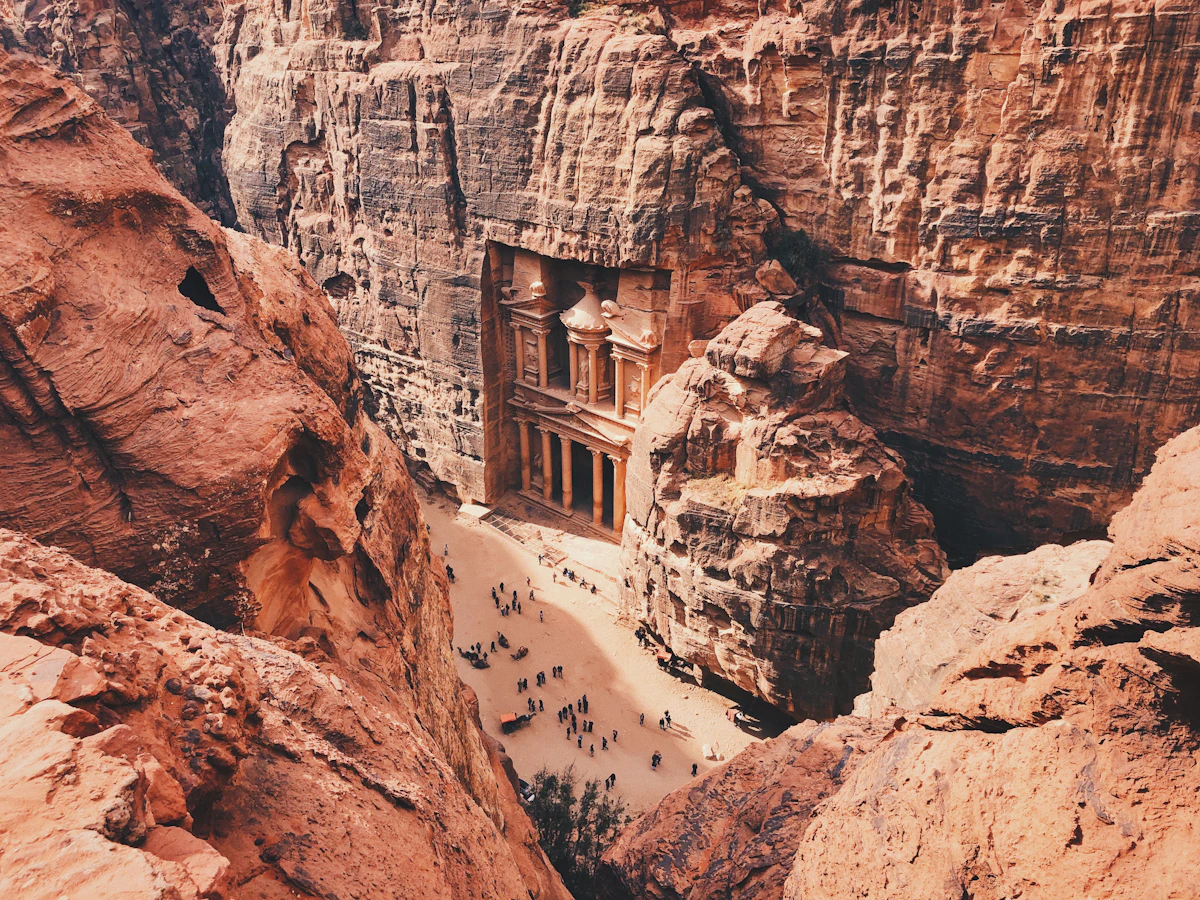
توجه إرشادات البتراء الرسمية الزوار إلى مركز الزوار للحصول على التذاكر والمعلومات والمساعدة، وتوفر خريطة رقمية رسمية للاستخدام دون اتصال. راجع شروط التذكرة أو التصريح المحدد وأي مستند مطلوب حالياً بدلاً من الاعتماد على لقطة شاشة قديمة. نزّل الخريطة واحفظ عنوان إقامتك في وادي موسى ووسيلة العودة ومراجع الحجوزات ونقطة لقاء واضحة دون اتصال.
eSIM لمدينة البتراء — أعدّه قبل السفروادي رم · دليل المدينة
تصف صفحة السياحة الرسمية طرق الوصول براً وبالحافلة إلى وادي رم من عمّان والبتراء والعقبة، وتحيل المسافرين إلى جدول الحافلات الحالي. تحقق من الترتيب قريباً من موعد المغادرة، ثم اطلب من المخيم أو الدليل نقطة اللقاء الدقيقة وما يشمله الحجز. احفظ الحجز ورقم التواصل والمسار وخطة العودة والماء وبيانات الطوارئ دون اتصال. بيانات الهاتف لا تعوض تأكيد الاستقبال أو الاستعداد للصحراء.
eSIM لمدينة وادي رم — أعدّه قبل السفرالعقبة · دليل المدينة
تميز إرشادات السياحة الرسمية للعقبة بين سيارات الأجرة ووسائط النقل العام والحافلات المحلية، وبين خيارات التنقل بين المحافظات نحو البتراء ووادي رم. طابق الفندق أو المحطة أو نقطة الاستقبال المحلية مع مرحلة المتابعة المنفصلة، وراجع المشغل الحالي والتذكرة. احفظ العنوان ونقطة الانطلاق والحجز والعودة دون اتصال. وإذا تابعت بحراً إلى مصر، فتعامل معها كرحلة دولية مستقلة تستلزم مراجعة الباقة والتذكرة وشروط الدخول الحالية الخاصة بها.
eSIM لمدينة العقبة — أعدّه قبل السفرلماذا Horizon
تختلف المصادر الحالية ونقاط الاستقبال بين المطار والموقع الأثري والصحراء والساحل في الأردن. تساعد الباقة المناسبة في فتح الصفحة المطلوبة ومراسلة مكان الإقامة أو الدليل وتعديل المسار، بحسب الباقة والجهاز والموقع الدقيق والشبكة الشريكة. وهي لا تحل محل خريطة دون اتصال أو نقطة لقاء مؤكدة أو تذكرة صالحة أو الاستعداد للمسار والماء أو مراجعة المعلومات الرسمية الحالية.
باقة إلى
الأردن
قارن حصص البيانات ومدد الصلاحية المدرجة لوجهتك.
ثبّتها عبر شبكة Wi-Fi موثوقة قبل المغادرة، واتبع تعليمات تفعيل الباقة.
راجع السعر الحالي والبيانات والصلاحية والتغطية قبل الدفع. لا توجد قيود على السرعة في باقات Horizon.
عندما تدعم الباقة المختارة إعادة الاستخدام أو إعادة التعبئة، يعرض قسم «eSIM الخاصة بي» الخيارات المتاحة لملف التعريف المثبّت.
سننبّهك عند اقترابك من الحد. وإذا كانت الباقة تدعم إعادة التعبئة، فسيعرض قسم «eSIM الخاصة بي» الخيارات المتاحة.
اختر تغطية دولة واحدة أو إقليمية أو عالمية، وتحقق من كل وجهة في تفاصيل الباقة.
قدّر أولاً احتياج البيانات ومدة مسارك في الأردن، ثم تحقق من قائمة المناطق الدقيقة ودعم جهاز غير مقفل ومتوافق مع eSIM والسعر النهائي عند الدفع. ينبغي أن تتوافق وجهات استخدامك مع نطاق باقة الأردن، لكن الاسم لا يدل على شمول المناطق المجاورة أو وجهتك التالية. لا تبدأ صلاحية الباقة إلا عندما يتصل eSIM لأول مرة بشبكة جوال مدعومة في الأردن، ولا تطبّق أي باقة أخرى قاعدة مختلفة. احتفظ بمرجع الشراء وخطوات الإعداد في مكان تستطيع الوصول إليه إذا تعذر استخدام هذا الهاتف.
أثناء الاتصال بـ Wi-Fi موثوق، افتح رسالة باقة الأردن ودليلها، وأضف الملف وفق التعليمات واحتفظ بالدليل خارج ذلك الهاتف. إضافة الملف لا تبدأ الصلاحية، ولن تبدأ مدتها إلا عندما يتصل eSIM لأول مرة بشبكة جوال مدعومة في الأردن. اترك الملف على الجهاز بعد إعداده، واختره لبيانات الهاتف فقط في الخطوة المحددة. قبل مغادرة Wi-Fi، احفظ مسار مطار الملكة علياء وخريطة البتراء وعنوان الإقامة ونقطة لقاء وادي رم وبيانات الدعم.
خطط لكل انتقال على حدة، فلا توجد تذكرة أو رحلة واحدة تشمل المواقع الأربعة كلها. في مطار الملكة علياء، قارن وجهة الحافلة العامة الحالية أو نقطة التاكسي الرسمي أو تعليمات التطبيق بعنوانك في عمّان. للبتراء، اتبع إرشادات مركز الزوار الرسمي ونزّل خريطته للاستخدام دون اتصال. ولوادي رم، راجع الجدول الحالي أو الترتيب البري وأكد نقطة لقاء المخيم أو الدليل بدقة. وفي العقبة، ميز النقل المحلي عن الرحلة بين المدن. راجع المصدر الرسمي المعني قبيل المغادرة واحفظ المسار والتذكرة وأرقام التواصل دون اتصال.
لا تستنتج وجود رقم أو رصيد مكالمات أو رسائل من اسم eSIM. تستخدم تطبيقات المراسلة والمكالمات اتصال البيانات المختار وفق إعدادات حساباتها. عندما يدعم الجهاز خطين نشطين، اختر ملف الأردن للبيانات في الخطوة المحددة، واترك التجوال مغلقاً على الخط الأساسي ما لم تقصد استخدامه وتحمل رسومه. اختبر الإعداد قبل أن يعتمد عليه استقبال في المطار أو تذكرة رقمية. مشاركة الإنترنت عبر نقطة الاتصال مجانية في كل باقات Horizon.
قائمة المناطق الدقيقة للباقة المختارة وحدها تحدد نطاق الخدمة المقصود؛ لا تستنتجه من اسم الأردن. يجب ذكر سوريا والعراق والسعودية وإسرائيل والأراضي الفلسطينية أو الضفة الغربية صراحة قبل توقع الخدمة في أي منها. مصر وجهة متابعة بحرية مستقلة من العقبة وليست دولة ذات حدود برية مع الأردن، ويجب ذكرها أيضاً. قد يتغير الاستقبال أو اختيار الشبكة أو ينقطع، فاحفظ المسار والمستندات الأساسية أولاً. لا تثبت eSIM أن معبراً مفتوح، ولا تمنح تأشيرة أو إذن دخول.
إذا لم يوفر ملف الأردن بيانات، اتصل أولاً بـ Wi-Fi موثوق واستخدم التعليمات المرفقة بذلك الشراء. لا تحذف الملف؛ فقد لا يعمل رمز إعداده مرة ثانية. تحقق من نشاط الباقة واختيار ملف الأردن خطاً للبيانات ومطابقة التجوال وAPN واختيار الشبكة للتعليمات، ولا تستخدم وضع الطيران أو إعادة التشغيل إلا إذا وجهتك إليها. إذا استمر العطل، أرسل للدعم رقم الطلب وطراز الهاتف والموقع والشبكة الظاهرة والخطأ ولقطات الشاشة. لا تشارك كلمات المرور أو بيانات الدفع الكاملة أو الأسرار، ولا تدخل منطقة غير آمنة بحثاً عن إشارة.
لا. لا توجد قيود على السرعة في باقات Horizon. لا يوجد حد يومي يبطئ اتصالك، لذا يمكنك استخدام باقتك كلها في يوم واحد إذا احتجت إلى ذلك. تعتمد السرعة على الشبكة المحلية وقوة الإشارة ومدى ازدحام الشبكة. وعندما تنفد بياناتك، تتوقف الباقة بدلًا من أن تبطئ.
نعم. نعيد دائمًا كامل المبلغ الذي دفعته عند طلبك، سواء كانت eSIM غير مستخدمة أو مستخدمة جزئيًا أو بالكامل. لا يوجد حد زمني لطلب الاسترداد.