














EN
“Very very easy to install” Find prepaid eSIM data for 190+ destinations. Choose a country, regional or global plan, install before you travel, and use mobile data for maps, messages and bookings when you arrive.
Country and regional plans.
Browse available travel eSIM plans by destination. Each card shows a current starting price; open a destination to compare data, validity, supported networks and coverage before checkout.
Choose a country plan for one stop or a regional or global plan for a wider itinerary. Confirm device compatibility and install over Wi-Fi before departure.
Buy a plan, install it, and watch your data — from the same app you travel with.


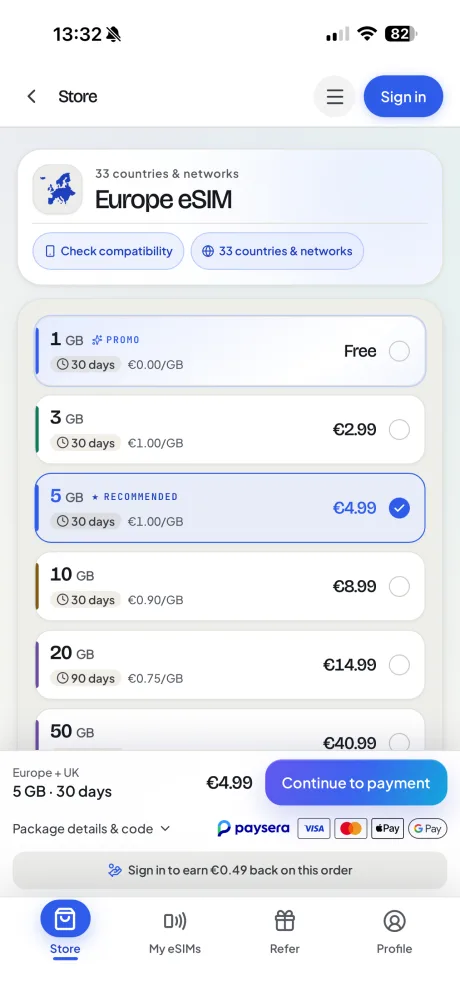
1 GB of Europe data, on us.
Download Horizon, open Europe in the app and claim the free package. Install it over Wi-Fi at home. The 30 days start at the first connection to a supported network in a covered country.
Apple and the Apple logo are trademarks of Apple Inc. App Store is a service mark of Apple Inc. Google Play and the Google Play logo are trademarks of Google LLC.
Choose by destination, then compare data and validity on the plan page.
For a city break, work visit or holiday in one country. Browse data plans for that destination.
Browse local plans by countryFor nearby countries on the same trip. Check that a regional plan covers every stop on your route.
Browse regional plansFor a journey across regions. Check the global plan’s country list against your itinerary.
Browse global plansChoose your coverage, install over Wi-Fi, then select your eSIM for mobile data at your destination.
Select a local, regional, or global prepaid data package tailored to your trip duration.
Scan your QR code or install with one tap before your flight over Wi-Fi. Your plan won't start until you connect abroad.
Enable your eSIM and select it for mobile data. Follow the plan’s roaming settings and connect to a supported network in a covered destination.
An eSIM is a digital SIM profile that many recent phones support. There is no plastic card to swap. Your provider sends the setup details, and your phone downloads the profile over Wi-Fi. On compatible dual-SIM devices, it can run alongside your normal SIM.
For travel, you can buy a prepaid data plan before you leave. Compare it with your carrier's current roaming tariff. Then check the plan's destination coverage, data and validity.
What is an eSIM — the full guideeSIM support depends on the exact model, sales region and carrier lock. Check the supported-devices list. Then make sure your phone is carrier-unlocked before you buy a plan.
Check supported devicesIndependent feedback
Read Horizon reviews on Trustpilot, or share your own experience.
Read reviewsTravelling to Morocco, Türkiye or another popular destination? Use these shortcuts to compare available data, validity, coverage and plan details before you buy.
Read travelers’ accounts of choosing, installing and using Horizon eSIMs on their trips.
“Very very easy to install” “Used this eSIM in North Macedonia and it worked really well. Setup was quick, the connection was fast and stable, and I had no problems using mobile data during the trip. Very convenient and easy to use. I would buy it again.” “Super easy and fast. I travelled to Berlin and I was able to buy, install and setup in 1 minutes while waiting for passport control. The connection was reliable and stable and service was excelent” “I used the Horizon Balkans eSIM on a recent trip. The best part was not having to think about buying a new SIM every time I crossed a border. I used it for maps, WhatsApp, checking hotels, finding restaurants, and looking up beaches and places to visit.
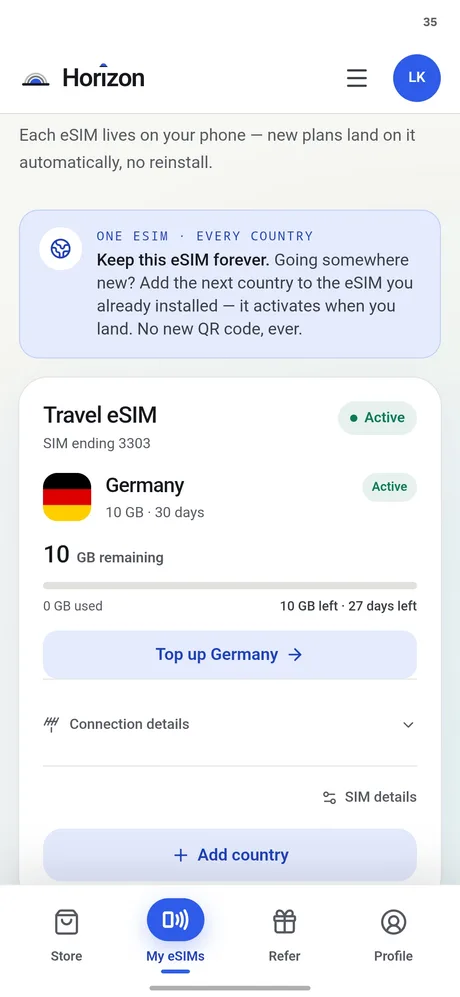
The package covers Albania, Bosnia and Herzegovina, Bulgaria, Croatia, Greece, Montenegro, North Macedonia, and Serbia and I added Kosovo eSIM to the same order. I would use it again for another trip through the Balkans” “Horizon eSIM made my trip so much easier. The setup was super fast and took only a minute right at the airport. The connection was fast, stable, and worked everywhere without any problems. Highly recommend it to anyone traveling!” “I was Traveling to Ksamil Albania and the esim in Albania worked perfectly. My first time using an esim 😂” Manage your travel plans in the Horizon app or My eSIMs. Open an existing eSIM to see its available top-up and destination options.
Choose by data allowance, validity, coverage and total price. Open the plan details to check supported networks and what is included before checkout.
Use mobile data for directions, messages and travel bookings away from Wi-Fi. Available networks depend on your plan and location. Horizon fixed-data plans have no throttling.
See your remaining data and plan status in My eSIMs. Check your balance during the trip and view available top-up options before you run low.
Yes, when the selected plan lists multiple countries. Choose a regional or global plan, confirm every stop in its coverage details, and follow its network and setup instructions in each destination. Coverage, networks and profile reuse depend on the plan.
You can keep your existing WhatsApp number and use Horizon for mobile data. Calls and SMS on your original number need your usual SIM or eSIM to remain enabled on a compatible dual-SIM phone. Your usual carrier’s roaming charges may still apply to that line.
No. Horizon fixed-data plans have no throttling. There is no daily limit that slows you down, so you can use your whole plan in one day if you need to. Your speed depends on the local network, your signal and how busy the network is. When your data allowance is used up, the plan stops rather than slowing down.
Hotspot sharing is free on every Horizon plan. Horizon fixed-data plans have no throttling. Enable Personal Hotspot on a compatible phone and keep Horizon selected for mobile data.
Yes. We always refund the full amount you paid when you request it, whether your eSIM is unused, partly used or fully used. There is no time limit for requesting a refund.
Maps and messaging generally use less data than streaming, video calls, cloud backups or tethering. Check your recent phone usage, allow for the length of your trip and confirm whether your chosen plan supports top-ups.
We recommend installing your eSIM over Wi-Fi right before you leave. Your validity period will not start until your eSIM connects to a supported mobile network at your destination. There is no deadline for first use. You can buy now and keep your plan for a future trip.
Only when the selected plan supports it. Open My eSIMs to see eligible data, validity or destination options; availability and profile reuse depend on the plan.
Content on Horizon is written and kept up to date by Lurian Kasumaj. About Horizon eSIM
