



Family & friends
How to buy an eSIM for your family, your parents or anyone else
You can buy a travel eSIM for anyone from your own Horizon account, one eSIM per person. Name each one in My eSIMs so you know whose is whose, then send it with WhatsApp, Viber or a copied link. They open the link on their phone and tap Install with one tap: no Horizon account, no app. Every eSIM stays in your account, so you can see how much data each person has left and top it up when a top-up is available for that eSIM.
Watch the 30-second video on YouTubeThe short version
- 01Check that each phone supports eSIM and is carrier-unlocked.
- 02Buy one eSIM per person in your Horizon account.
- 03In My eSIMs, tap the pencil and name each eSIM: Mum, Dad, Grandma.
- 04Under Install eSIM, tap WhatsApp, Viber or Copy link and send each person their own link.
- 05They tap Install with one tap, and you see everyone's data in My eSIMs.
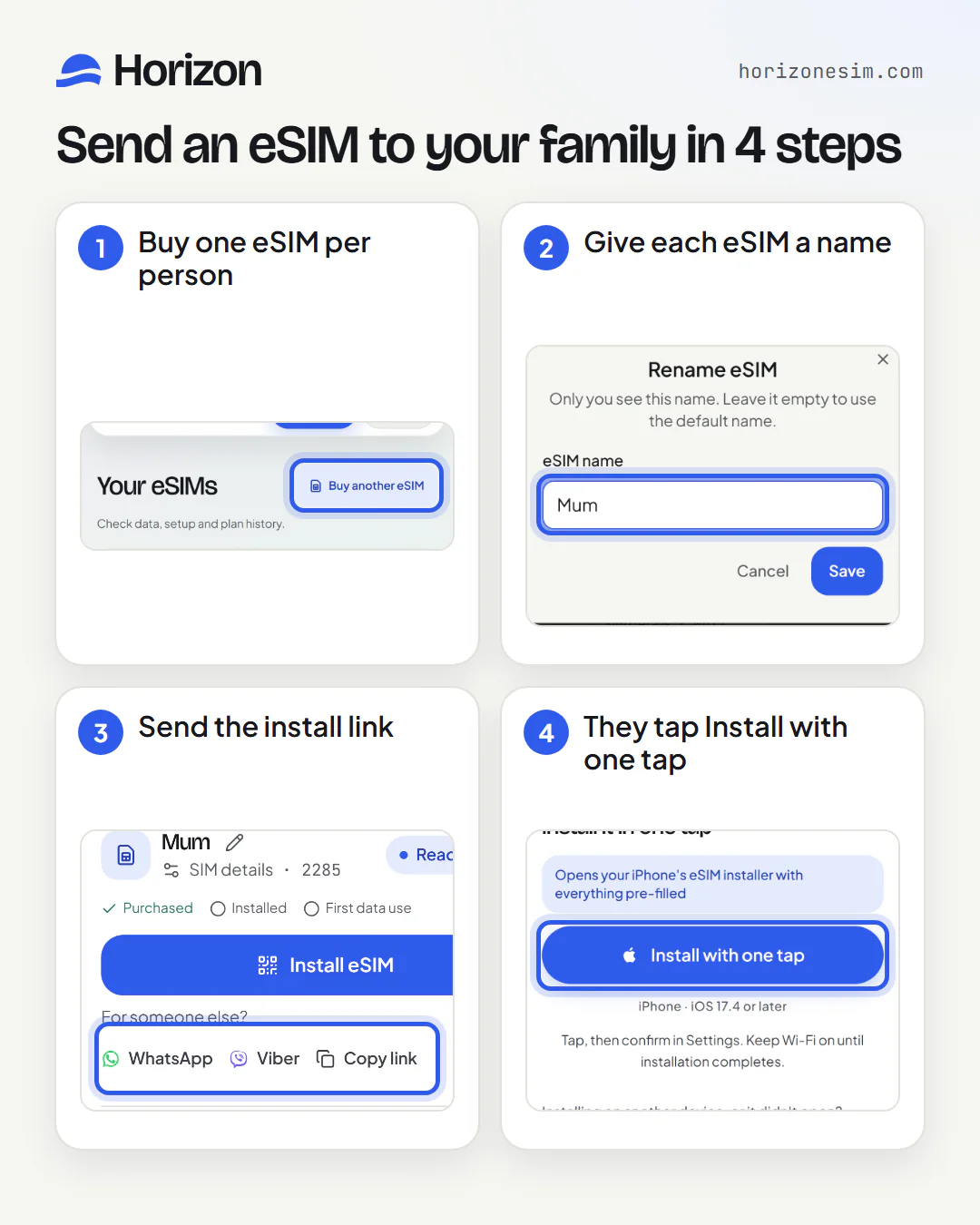
Step by step: buy, name and send an eSIM to a family member
Six steps, with annotated screenshots of the real app. They work the same for parents, grandparents, children, a partner or a friend.
Step 1
Check that every phone can use an eSIM
Each person needs a phone that supports eSIM and is carrier-unlocked. Check before you buy: a phone without eSIM support can't install one, and a carrier-locked phone may refuse another network's eSIM.
- Quick self-check: dial *#06# — if an EID number appears, your phone supports eSIM.
- On iPhone, open Settings → General → About. Carrier Lock should say “No SIM restrictions”. On Android, the carrier that sold you the phone can confirm its lock status. A locked phone cannot use another provider’s eSIM, so ask that carrier to unlock it before you buy.
Step 2
Buy one eSIM per person
Choose the destination and the plan, and pay once for each person: every checkout is for one eSIM, so a family of four makes four purchases, and each person can have the plan that suits them. Every eSIM appears in My eSIMs as its own card, called Travel eSIM, Travel eSIM 2 and so on. For the next person, tap Buy another eSIM at the top of My eSIMs.
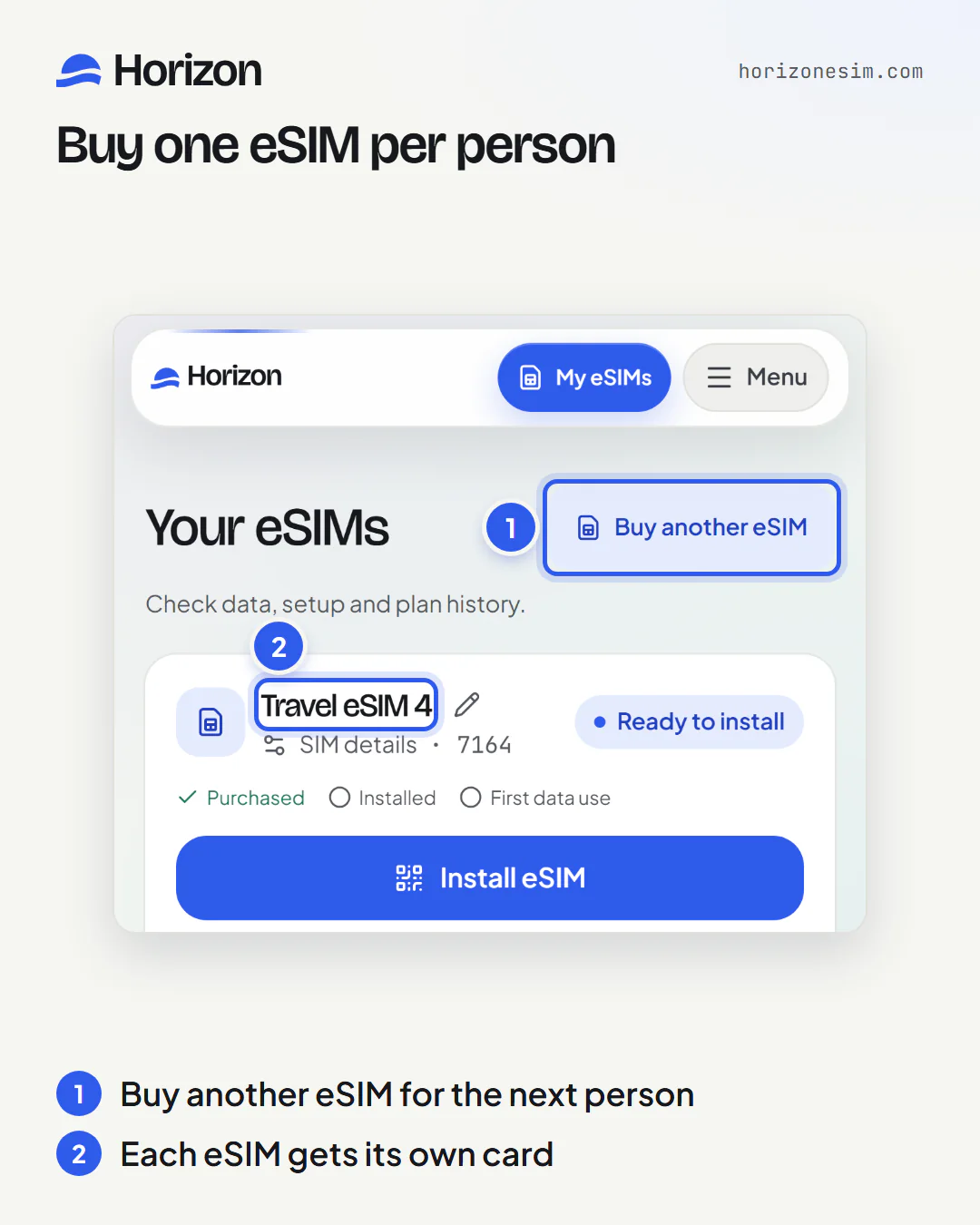
Every eSIM you buy lands in My eSIMs as its own card. Step 3
Give each eSIM a name
Tap the pencil next to the eSIM's name, type who it's for, such as Mum, Dad or Grandma, and tap Save. Only you see this name: it stays in your account and never reaches their phone. Leave the field empty to go back to the default name.
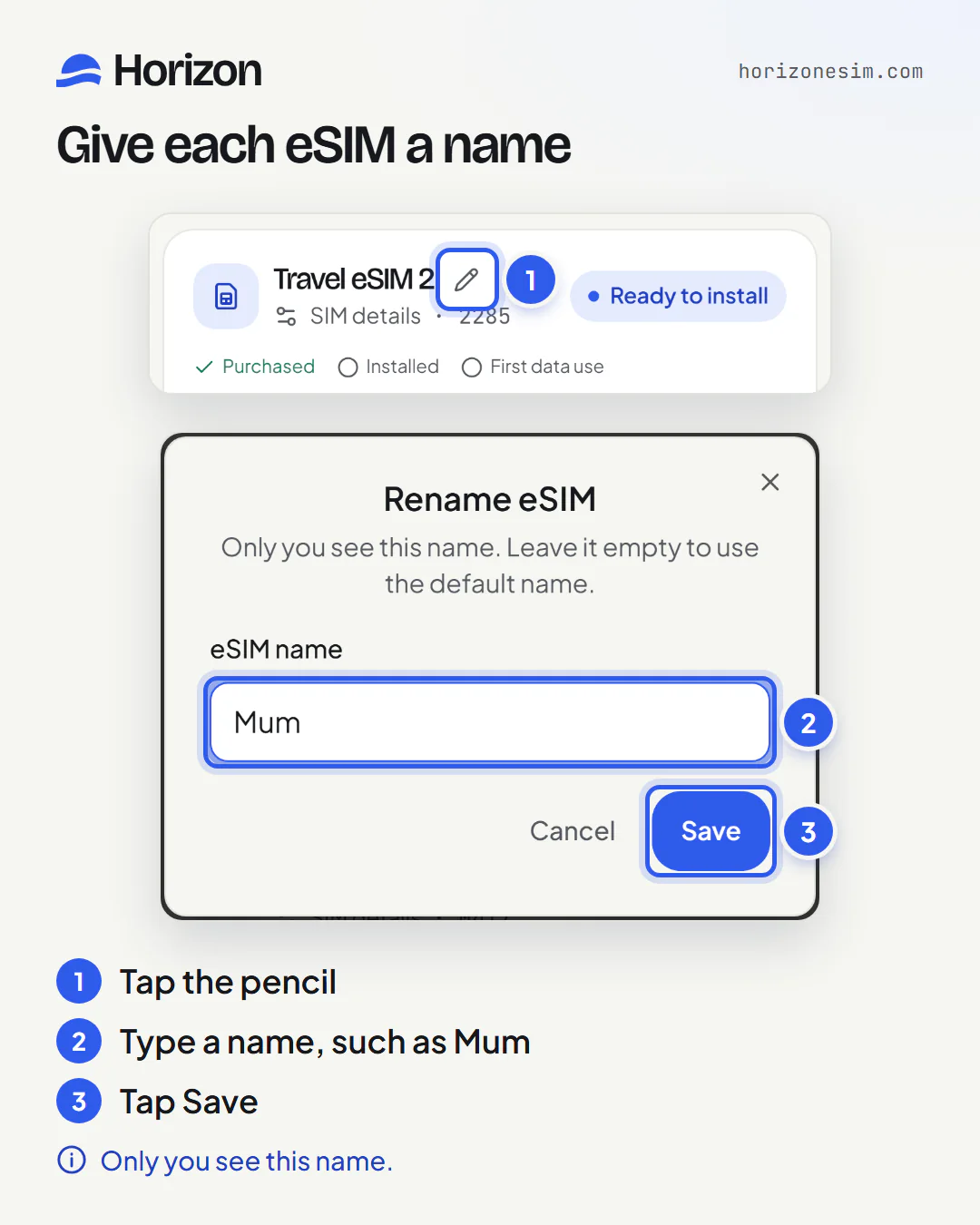
Tap the pencil, type a name, save. Step 4
Send each person their install link
Under Install eSIM, each card shows For someone else? with three choices. WhatsApp and Viber open a ready-made message that says their Horizon eSIM for the destination is ready, followed by the link. Copy link puts the link on your clipboard, so you can paste it into any chat, text message or email. Send each person the link for their own eSIM.
The three choices stay on the card while the eSIM still needs installing, because an eSIM installs on one phone.
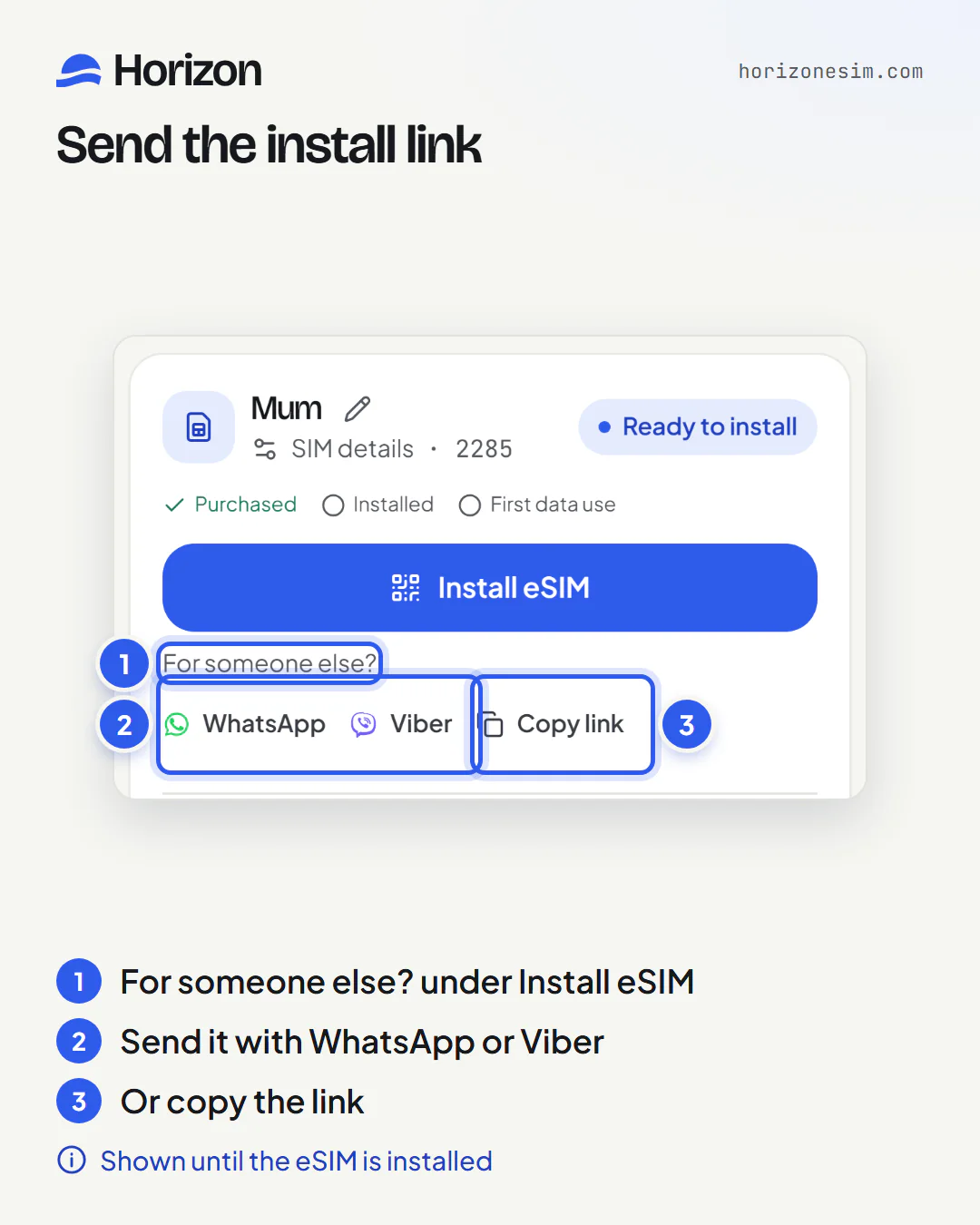
WhatsApp and Viber open a ready-made message with the link. Step 5
They install it with one tap
The link opens a page on their phone that says Your eSIM is ready. On an iPhone with iOS 17.4 or later, or an Android phone with Android 10 or later, Install with one tap opens the phone's own eSIM installer with everything filled in. They confirm, and keep Wi-Fi on until the installation completes. On other phones, Installing on another device, or it didn't open? shows a QR code and the details to type in by hand.
- Install over reliable Wi-Fi before travel; validity does not start until the eSIM first connects to a supported network at your destination.
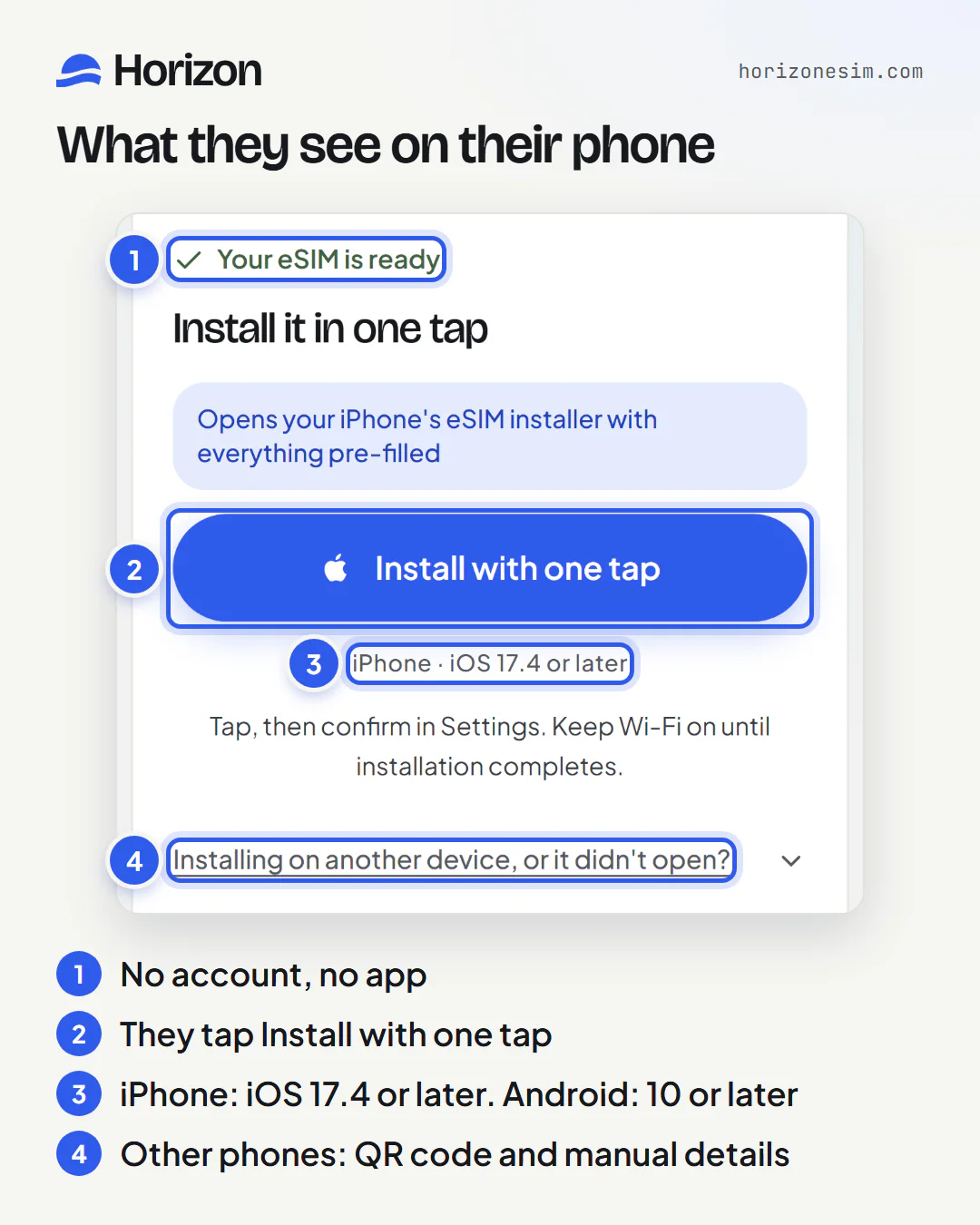
One tap opens the phone's own eSIM installer. Step 6
Keep an eye on their data
Sending the link doesn't move the eSIM out of your account. My eSIMs keeps showing each eSIM with its latest reported data, so you can see who is running low. When a top-up is available for that eSIM, Top up adds data from your own phone, wherever they are, and they don't have to reinstall anything.
How eSIM top-ups work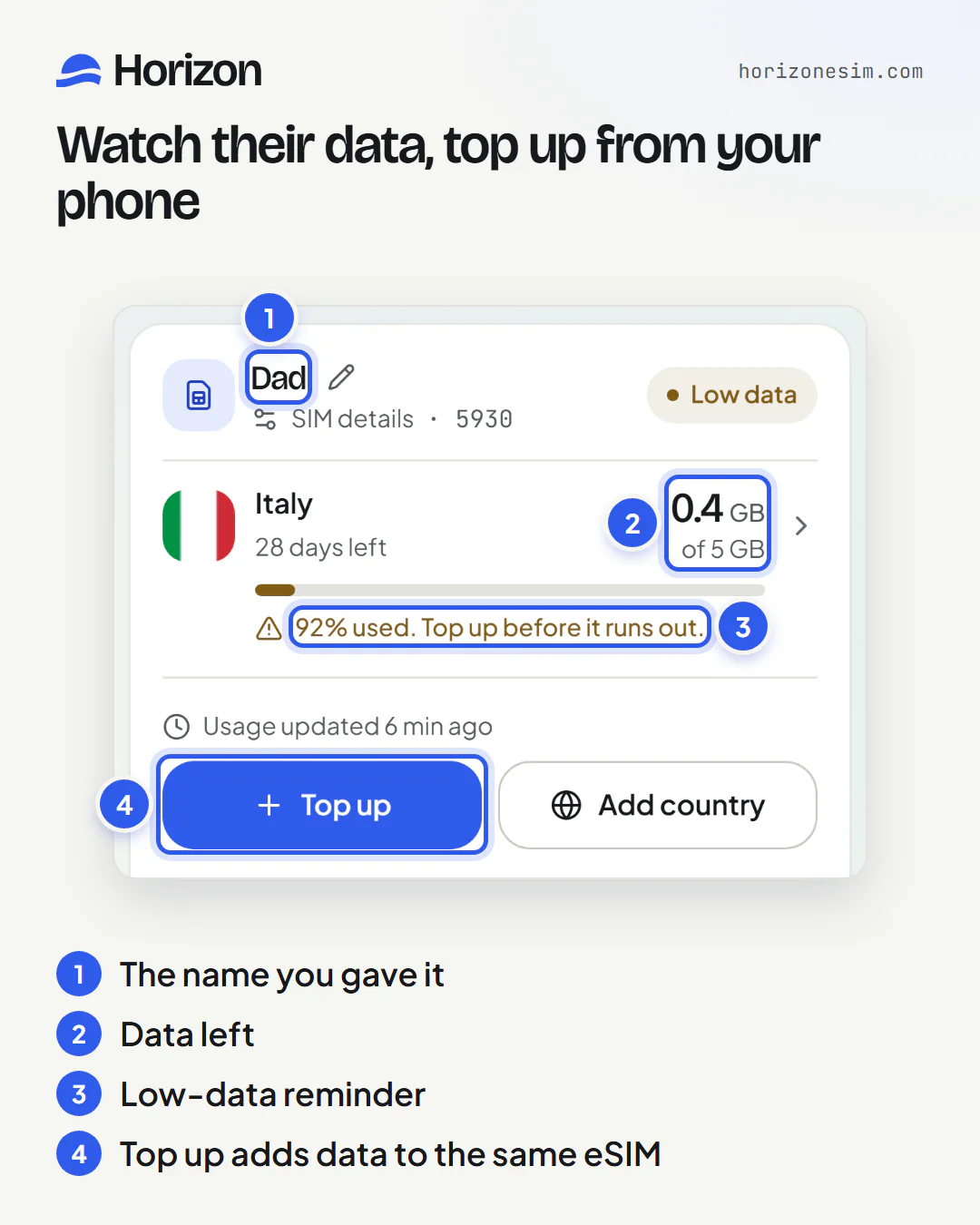
When someone is running low, their card says so, with Top up right below.
01
Can I buy an eSIM for someone else?
Yes. You buy it in your own Horizon account, the same way you would for yourself, and send it to the person who will use it. They don't need a Horizon account, the app or a payment card, only a phone that supports eSIM. The eSIM stays in your account, where you can follow its data and top it up when a top-up is available for that eSIM.
- One eSIM per person: an eSIM installs on one phone.
- Give it a name in My eSIMs so you know whose it is.
- Send the install link with WhatsApp, Viber or Copy link.
02
How do I buy an eSIM for my parents?
Buy one eSIM for each parent, name them Mum and Dad in My eSIMs, and send each of them their own link. If you can, install them together before the trip: open the link on their phone and tap Install with one tap, or open it on your own screen and let them scan the QR code with their phone.
- Check their phone first: dial *#06# and look for an EID number.
- Install over reliable Wi-Fi before travel; validity does not start until the eSIM first connects to a supported network at your destination.
- Turn data roaming on for this eSIM.
03
What's the easiest way to set up an eSIM for elderly parents?
Set it up with them, in person if you can, a few days before they leave. Install it at home over Wi-Fi and check that the new line appears in the phone's SIM settings. On arrival they switch the Horizon line on, choose it for mobile data and turn on data roaming for it, so show them where those three settings are.
- Most phones let you give the new line a label, such as Travel, so it's easy to find on arrival.
- Leave their home SIM on for calls and texts if the phone supports two lines.
- Keep the link: it opens the QR code and the manual details again if you need them.
04
Can I send an eSIM to someone in another country?
Yes. The link works wherever they are, so you can buy the eSIM at home and send it to a friend or relative abroad by WhatsApp, Viber or email. They install it over Wi-Fi from wherever they are before they travel.
- Install over reliable Wi-Fi before travel; validity does not start until the eSIM first connects to a supported network at your destination.
05
Can I install an eSIM on someone else's phone for them?
Yes, when you have their phone in your hands. Open the link on their phone and tap Install with one tap. If one-tap installation isn't available on that phone, open the link on your own phone or computer and scan the QR code with theirs. Always install it on the phone that will use it.
An eSIM can usually only be installed once, so don't delete the profile until your plan is finished. If you run into trouble, contact support before deleting anything.
08
Can I buy several eSIMs at once?
Each checkout is for one eSIM, so you buy them one after another: pay for the first, then tap Buy another eSIM in My eSIMs for the next person. Each eSIM can be a different plan, so a teenager who streams video and a grandparent who mostly uses maps can each get the data they need.
09
How do I know which eSIM is whose?
Name them. Every eSIM starts with a default name, such as Travel eSIM 2, and each card shows its last four digits next to SIM details. Tap the pencil, type a name and tap Save. Only you see the names, and you can change them at any time, even after you've sent the link.
10
Does the other person need a Horizon account or the app?
No. The link opens in their phone's browser, and the phone's own settings do the installation. They don't sign in and don't pay anything. If they'd like the eSIM in an account of their own, buy it in their name with Family & friends instead.
11
What does the person see when they open the link?
The eSIM's order page, the same page you see after paying. It shows the order total, so they will see what you paid, and a note meant for the buyer about the emailed install details. Below that are Your eSIM is ready, the Install with one tap button, and, for other devices, the QR code and the details to enter by hand.
12
Can I see how much data my family has left?
Yes. Every eSIM you bought stays in My eSIMs with its latest reported data, for example 0.4 GB of 5 GB. When someone has used most of their data, their card shows a reminder with a Top up button, so you can add data before they run out.
13
Can I top up an eSIM I sent to someone else?
Yes, when a top-up is available for that eSIM. Tap Top up on their card in My eSIMs and pay from your own phone, wherever they are. The data is added to the same eSIM, so they don't have to reinstall anything or open the link again.
How eSIM top-ups work14
Can I buy someone an eSIM as a present?
Yes, you can pay for someone's eSIM and send it to them. Two things to know first: the link opens the order page, which shows the order total, and the eSIM stays in your account, so you keep seeing its data. If you'd like the install details to reach them by email, in their name, use Family & friends.
15
Can I buy an eSIM in someone else's name?
Yes, with Family & friends. Save the person with their email address, buy a plan in their name, and the install details are emailed to them. If they create a Horizon account with the same email, the eSIM also appears in their account, and it stays in yours too.
Open Family & friends16
Is it safe to send an eSIM link over WhatsApp or Viber?
Yes, as long as it goes to the right person. The link opens that eSIM's install details without a password, so anyone who has it could install the eSIM. Send it in a one-to-one chat, not a group, and don't post it publicly.
An eSIM can usually only be installed once, so don't delete the profile until your plan is finished. If you run into trouble, contact support before deleting anything.
17
What if they delete the eSIM or get a new phone?
An eSIM can usually only be installed once, so don't delete the profile until your plan is finished. If you run into trouble, contact support before deleting anything. For a later trip on a new phone, buy a new eSIM for that phone.
18
Will they keep their own phone number?
On a compatible, carrier-unlocked dual-SIM phone, you can usually leave the home SIM enabled for calls and texts and select the travel eSIM for data. Your home carrier may charge for roaming activity, and behavior depends on the model, settings and selected plan. Horizon plans are data-only, so the eSIM adds mobile data and no new number.
19
Can I buy an eSIM for my child or teenager?
Yes, the same way as for anyone else, as long as their phone supports eSIM and is carrier-unlocked. It works well for school trips and exchanges: the eSIM stays in your account, so you can see how much data they have left and, when a top-up is available for that eSIM, top it up from your phone while they are away.
20
When should they install it, and when does the plan start?
Install over reliable Wi-Fi before travel; validity does not start until the eSIM first connects to a supported network at your destination. There is no deadline for first use. You can buy now and keep your plan for a future trip.
21
What if someone's phone doesn't support eSIM?
Then that phone can't install an eSIM. They can still get online on the trip by joining the hotspot of a family member whose phone has a Horizon eSIM, since hotspot sharing is free on every Horizon plan.
22
Can each person have a different plan or destination?
Yes. Each eSIM is its own purchase, so the plans can differ in data, duration and destination: a bigger plan for the person who works on the road, a smaller one for the person who mostly messages, or an eSIM for a different country altogether.
Quick answers
Can I send the link again?
Yes. While the eSIM still needs installing, WhatsApp, Viber and Copy link stay on its card in My eSIMs, and the link stays the same.
Can I rename an eSIM after sending it?
Yes. The name is saved only in your account, so changing it never affects the eSIM on their phone.
Do I need to be with them to install it?
No. They can install it wherever they are, as long as they have Wi-Fi and a phone that supports eSIM.
Is there a family plan with shared data?
No. Each person gets their own eSIM with its own data; there is no shared allowance. Hotspot sharing is free on every Horizon plan, so one phone can share its data with others nearby.
Can I manage their eSIMs in the Horizon app?
Yes. My eSIMs in the Horizon app for iPhone and Android shows the same eSIMs as the website when you sign in with the same account.
Will they see what I paid?
Yes. The link opens that eSIM's order page, which shows the install details and the order total. Keep that in mind if the eSIM is a present.
Watch it in 30 seconds
A hand-drawn film about buying eSIMs for the whole family, naming them and sending each one with a tap.
Key moments
Transcript
Every family has one person who sorts out the phones. Horizon is a travel eSIM for 190-plus destinations. Buy one for each of them. In My eSIMs, give each one a name: Mum, Dad, Grandma. Then send each person their install link. No account needed. They install it with one tap. See how much data each one has left, and top up from your phone. Horizon. eSIMs for everyone you travel with.
eSIMs for everyone you travel with
Choose the destination, buy one eSIM per person, and send each of them their link.
Browse destinations