




The iPhone Duo has no SIM tray in any country, so the travel SIM you once bought at arrivals is now a download. Keep your home number on one eSIM line, put a Horizon data plan on the second, and install it over Wi-Fi before you fly. Validity does not start until your eSIM first connects to a supported mobile network at your destination.
Choose the plan by route: Europe for a trip across European countries, USA for the United States, and World when the trip crosses continents. The rest of this guide is about the trip itself: what to set up the night before, what the phone asks when you land, what unfolding the screen changes, and how the Horizon app looks on both screens. If your own number is not on the Duo yet, start with our guide to the Duo's eSIM-only design, which covers moving it across.
Two screens, two lines, no tray
Apple's first foldable doubles almost everything a traveller touches. It has two displays and runs two eSIM lines at once, and the one part it removes is the part travellers used to fiddle with at arrivals: the tray.
Apple puts it plainly: the Duo takes no physical SIM card in any country, keeps two eSIMs active at the same time and stores eight or more. On a trip, those numbers settle into a routine. One line keeps your home number for calls, texts and the codes your bank sends. The other carries the data, from a plan bought for where you are. Horizon plans are data-only, so the travel line never competes with your number; it sits beside it. Apple's travel guidance adds that with both lines on, your primary line keeps working as usual, and that FaceTime and iMessage stay on your home number even if you switch that line off.
The two screens split the trip the same way. Folded, the 5.4-inch outer display is a phone you can use with one hand in a queue: the boarding pass, the gate change, the switch for the travel line. Open, the 7.6-inch inner display can show two apps side by side, so the map sits next to the hotel confirmation instead of behind it.
As for the tray, Apple still mentions carriers that sell eSIMs at airport kiosks, but nothing on the Duo accepts a plastic card. Whatever you buy, you install, and doing that at home on Wi-Fi is calmer than doing it at a gate.
Which plan fits the route: Europe, USA or Global
Asking for the best eSIM for iPhone Duo is really asking which country list matches your trip. The iPhone Duo is on Horizon's list of supported devices, so the route decides, not the phone.
| Your trip | Horizon plan | Check before you buy |
|---|---|---|
| Several European countries, or Europe and the UK | Europe eSIM | Every country you sleep in or pass through is on the plan's list |
| The United States | USA eSIM | Puerto Rico or another territory is named on the plan if your route reaches one |
| Two or more continents | World | Every stop on the route is on the list of the package you pick |
Europe. The Europe + UK plan shares one data allowance across the destinations listed in its coverage details, so a train from Paris to Milan needs no new plan at the border. The list, not the word Europe, decides where it works, so check every country before you pay, including the ones you only cross. For a stay in a single country, a country plan can be the simpler choice.
USA. The USA plan is a country plan for the United States, with allowances that run from a city weekend to a long road trip. Do not assume a mainland plan includes Puerto Rico, the US Virgin Islands or Guam: if your route reaches one, check that the plan names it.
World. World is Horizon’s main worldwide plan, with one data allowance across its listed countries and territories. It suits trips across continents. Check every stop against the current country list before buying.
Hotspot sharing is free on every Horizon plan.
The night before: set up the second line
- Check the lock. A travel eSIM needs a phone that is not locked to a carrier. Open Settings → General → About and look for “No SIM Restrictions” next to Carrier Lock. If a phone bought on a carrier deal shows a lock, ask that carrier to unlock it before you buy a plan; our help page explains the check.
- Install over Wi-Fi. Use the install link when your order offers one: it opens the iPhone's own eSIM installer with the details filled in, and you approve its prompts. If iOS asks whether you plan to use the new eSIM at home or while you travel, this one is for travel. Two screens do not help with a QR code, because a phone cannot scan a code shown on its own display. Open the code on a second screen instead, or use manual entry with the SM-DP+ address and activation code from your installation details. The installation guide has every step.
- Label the lines. Under Cellular Plan Label, name them Home and Travel, so the right line is obvious when you choose one for a call or for data.
- Leave it off. Installing does not start your plan. If you do not need the line yet, keep it switched off until you arrive.
Keep the eSIM installed after the trip, too. Whether a deleted profile can be installed again depends on that eSIM, so never delete it as a troubleshooting step.
When you land: what iOS asks, and what to switch
The Duo ships with iOS 27. Apple says that from iOS 26, a travel eSIM bought before departure can bring up a Turn On Travel eSIM notification when you arrive. You then choose Travel eSIM Only, or Travel eSIM and Current eSIM to keep your home line on as well; with both, the travel eSIM is used for data.
If no prompt appears, the switches are the ones on any recent iPhone. Menu names vary by language and region.
- In Settings → Cellular, open the Horizon line and turn on Turn On This Line.
- Under Cellular Data, choose the Horizon line.
- Turn on Data Roaming for the Horizon line only. A travel eSIM uses local networks abroad, so your phone treats it as roaming.
- Turn off Allow Cellular Data Switching, so data does not fall back to your home line.
There is no separate activation step. Keep data roaming off on your home line. Your home carrier may still charge for calls, texts or data on its own line.
On the way back, Apple says iOS 26 and later can switch the travel eSIM off and your home line back on, depending on your country or region. If that does not happen, check that Turn On This Line is on for your home line.
What unfolding changes, and what it does not
Open the Duo and the trip gets a bigger desk. Apple keeps the aspect ratio the same on both displays, so content fills the screen whether the phone is open or closed. Open is where a city map and a booking confirmation share the screen, or a translation app sits next to a menu.
Folded is the travel-day mode. Apple rates video playback longer on the outer display than on the inner one, which makes the closed phone the frugal choice on a long day of transfers.
What unfolding does not change is the connection. The eSIM, the line chosen for data, the plan and its remaining allowance are the same whichever screen is lit. Folding the phone does not switch lines.
The habit that does change is video. It spends a travel allowance faster than anything else, and a 7.6-inch screen invites more of it. If you stream on the inner display, watch the remaining data in My eSIMs, or turn on Low Data Mode for the travel line.
The Horizon app on iPhone Duo, folded and unfolded
We checked version 1.12 of the Horizon app on Apple's iPhone Duo simulator running iOS 27.1, not on a phone in hand. The app is built with Apple's iOS 27.1 SDK, so it fills both screens edge to edge.
Folded, on the 5.4-inch outer screen, the app uses its phone layout. The tab bar sits at the bottom with Store, My eSIMs, Refer and Profile, and the app keeps clear of the status bar and camera, which sit in a column on the edge of the outer screen. Unfolded and held upright, on the 7.6-inch inner screen, the app keeps the same tabs at the bottom, with more room: the big region banners sit one per row, country cards two to a row, and plan cards three across.
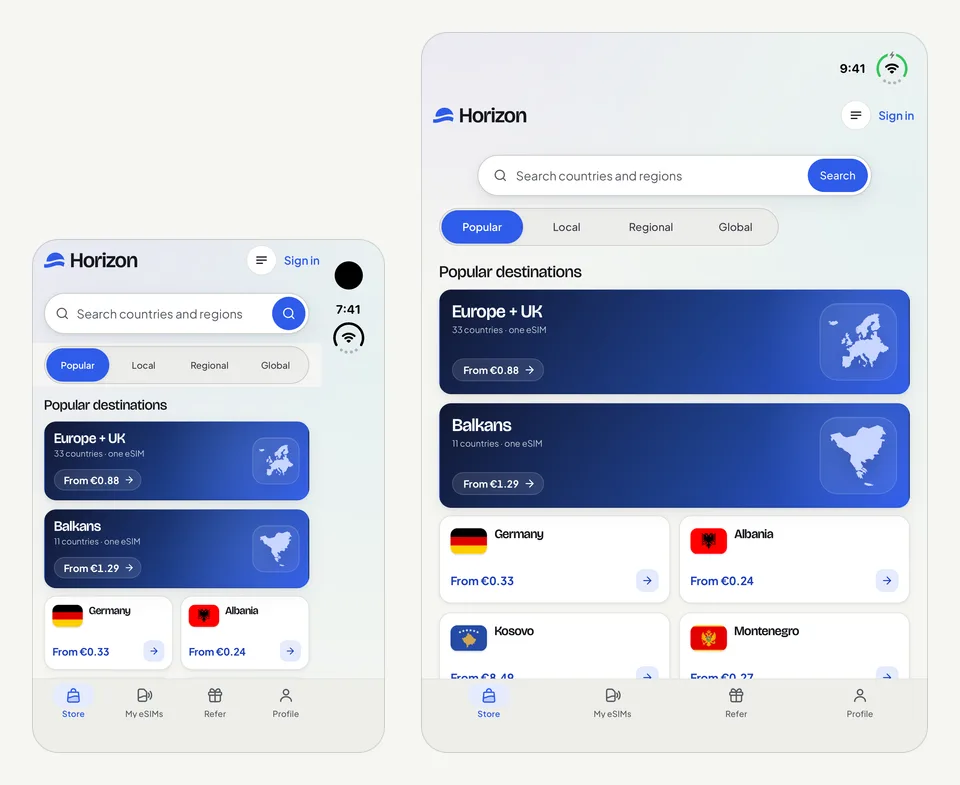
Turn the open phone sideways and the tabs move into a rail down the side. Country cards stay two to a row, and plan cards sit four across.
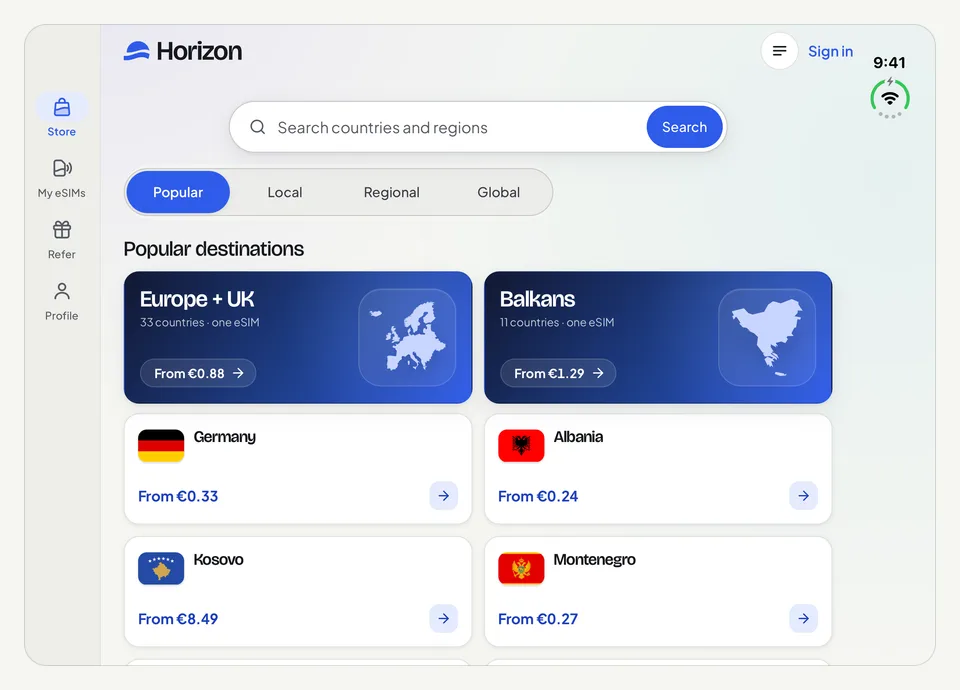
Folding or unfolding mid-task does not restart the app: it follows the new screen in place. We folded and unfolded the phone on the Store screen, and the layout followed.
Short answers
Does the iPhone Duo have a SIM card slot? No. Apple sells it without a SIM tray in every country, so every line on it is an eSIM.
What is the best eSIM for iPhone Duo? The one whose country list covers your whole route. Compare the destination list of the plan before you pay, not the name on the card.
Can I keep my number and use a travel eSIM on iPhone Duo? Yes. Keep your home line on for calls and texts and choose Horizon for mobile data. Your home carrier may still charge for calls, texts or data on its own line.
How many eSIMs can the iPhone Duo hold? Apple lists two active at once and eight or more stored.
Can I keep the Horizon eSIM for my next trip? Yes, leave it installed. When My eSIMs shows Top up for the same destination, or Add country for your next stop, the new plan is added to the eSIM already on your phone, so there is no new QR code to scan. Some destinations need a separate new eSIM. eSIM top-ups explains the options.
Does unfolding the Duo affect the eSIM? No. The line, the plan and its data are the same on both screens.
How does the Horizon app look on iPhone Duo? On Apple's iPhone Duo simulator, it uses its phone layout on the folded outer screen, keeps the tabs at the bottom when unfolded upright, moves them into a side rail when turned sideways, and follows a fold without restarting.
Horizon offers 24/7 human support in all languages, with guaranteed instant replies. Contact our team.
Sources
Checked on 26 October 2026: iPhone Duo technical specifications, iPhone Duo overview and Use eSIM while traveling internationally with your iPhone, all from Apple, plus Horizon's own plan pages.